Typical application scenarios
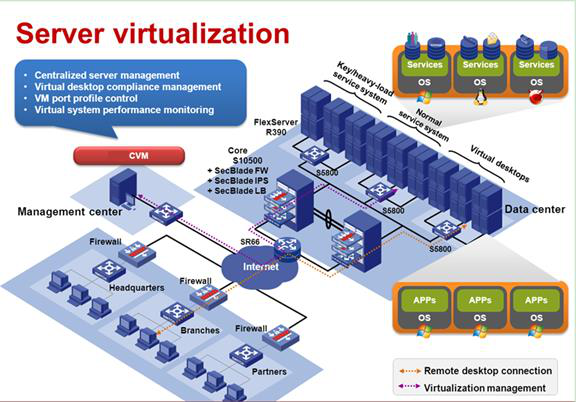
Scenario: Server virtualization
An enterprise hopes to achieve the following goals by integrating the server resources of its data center through server virtualization:
• Improve the hardware resource usage of the data center.
• Control the IT resource demands.
• Reduce the purchase and maintenance costs for customers.
• Save the equipment room space as well as equipment room power supply and cooling costs.
Analysis
The enterprise requires to perform centralized management on the server resources of its data center, deploy services and application systems based on the virtualization environment, and ensure that all its branches, offices, and partners can access the service and application systems as if they were in a physical network. To achieve these goals, configure NSphere CVM and use its server management and virtualization features to perform centralized management on the hardware resources and deploy the service application systems based on the virtualization environment.
Service planning
Network planning
In the system, plan the management network, service network, storage network, backup network, and migration network separately. You must plan the management network, service network, and storage network at least.
Storage planning
• Local disk planning If a server has two local disks, configure RAID 1 for the disks. If a server has more than two local disks, configure RAID 5 for the disks.
• External storage planning The system supports IP SAN and FC SAN storage devices. As a best practice, configure RAID 5 or RAID 6 for the storage devices. NSphere supports shared file systems that are not larger than 64 TB. As a best practice, assign 10 to 64 TB to a storage volume.
Data center, cluster, host, and shared file system planning
A data center can have a maximum of four HA clusters, and each HA cluster can have a maximum of 32 CVK hosts. A cluster can have a maximum of 32 shared file systems. The system supports shared file systems that are not larger than 16 TB. A shared file system can be used by one cluster.
Configuration workflow
Create data center On CVM
On storage devices Create cluster
Assign hosts to cluster
Configure host clock synchronization
Create vSwitches
IP SAN FC SAN Identify storage type
Set host IQN
Create hosts and bind IQNs Create LUNs and mappings
Add shared file system storage pools
Create VMs
Configure VMs