Webpage layout
The following is the webpage layout of CVM:
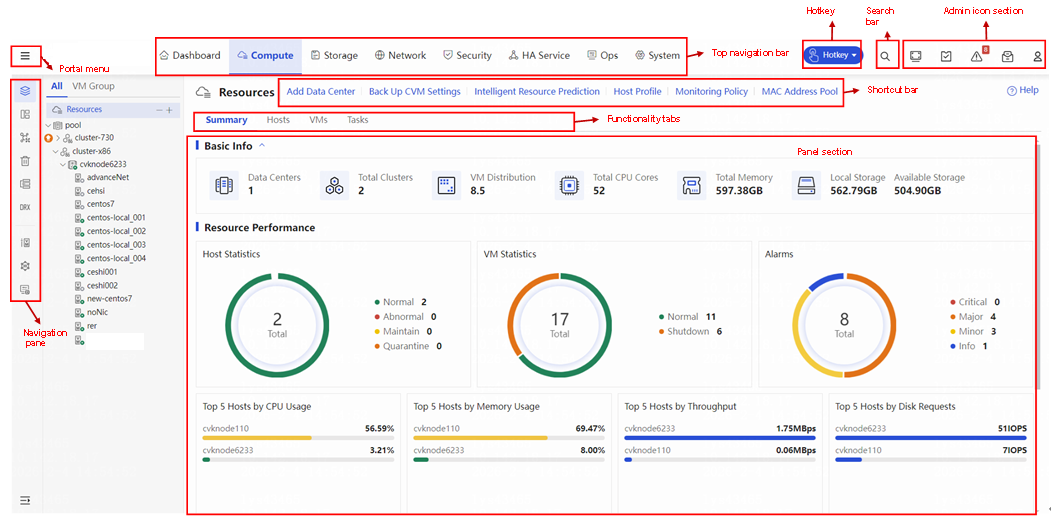
• Portal menu—Displays all services in the management platform, allowing you to add services to the favorites menu by clicking the icon, and to quickly search services by click the icon.
• Top navigation bar—Contains functionality categories. If you click a category, the navigation pane displays all features and functionalities of that category.
• Navigation pane—Contains menus of all features and functionalities. If you select one menu item, the system displays the operation area for the menu item on the right. You can expand or collapse the navigation pane as needed.
• Functionality tabs—Provides access to different management functionalities and tasks.
• Panel section—Displays operating information and the work pane for the selected feature.
• Shortcut bar—Displays links to commonly used features and functionalities. The displayed shortcut links automatically adapt to the menu item you select from the left navigation pane.
• Search bar—Supports searches for hosts or VMs. Fuzzy search is supported.
• Hotkey—Provides hotkeys for health inspection, resource export, VM restoration, VM shutdown, and resource analysis.