O&M capabilities and general recommendations
Features
• O&M architecture
• General O&M recommendations
• Basic O&M
• Advanced O&M
• Special-purpose O&M
• Custom O&M
O&M architecture
The O&M architecture provides visualized, standard, and granular system operations management to
help the system administrators operate and maintain the system with ease for higher efficiency. As shown in Figure-1, the O&M architecture provides basic, advanced, scenario-based, and custom O&M capabilities. Figure-1 O&M architecture
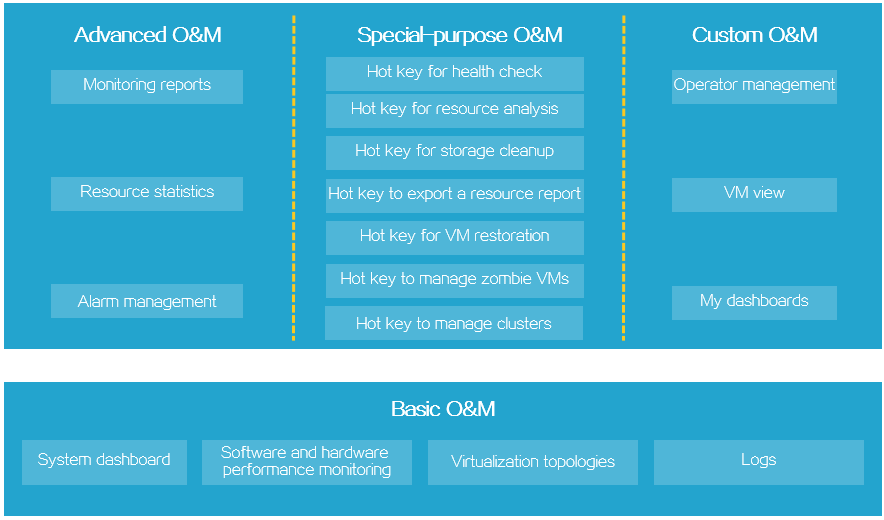
• Basic O&M capabilities—Help you gain a holistic view of the NSphere platform in tables and graphs. Available information includes resource usage statistics and distribution, network topology of hosts, VMs, and resources, task progresses, and log.
• Advanced O&M capabilities—Provide actionable statistics and insights.
General O&M recommendations
• Review the health state and resource usage of the system daily.
• Subscribe to system alarm notifications. After receiving an alarm, take action as recommended to clear the alarm. On the management platform, you can maintain a list of maintenance records for each alarm.
Basic O&M
Related Features and functions Description topics
Present real-time host and VM states in Resource tables and graphics to help you quickly summaries gain a holistic view of resource usage across the platform.
System Present system health, host and VM Dashboard dashboard state statistics, usage of resources Full-screen (CPUs, memory, and storage), storage display cluster capacity, and system alarms.
Present top five hosts and VMs by their CPU, memory, and storage usage. Monitor the operating state and Display Host performance of host hardware. In hardware Software hardware addition, the management platform monitoring and monitoring monitors storage, physical NICs, GPUs, information hardware and storage controllers in real time. for a host performance monitoring Performance • Display Monitor hosts, VMs, and storage monitoring perform clusters and resource usage in the ance
Related Features and functions Description topics
virtualized environment. monitori ng • View resource usage and informat performance statistics for a host. ion These statistics include the CPU about a usage, memory usage, disk I/O host throughputs, IOPS, and usage of the shared file system. • Display VM • View resource usage and perform performance statistics for a VM. ance These statistics include the CPU monitori usage, memory usage, disk I/O ng throughput statistics, network informat throughputs, IOPS, disk I/O delay, ion disk usage, and partition usage. Monitor active programs, processes, and services on VMs to provide their VM resource usage statistics. Display VM processes process and services You can obtain the username, process monitoring monitoring ID and process name of each process information and their CPU usage, memory usage, and used memory capacity. Display the relationship between clusters and hosts as well as hosts and Display the Virtualization Compute VMs. You can view the alarms for the compute topologies topology hosts and VMs and the CPU usage, topology memory usage, and shared storage usage of each cluster. Display the connections between hosts Virtualization Storage View storage and storage as well as between VMs topologies topology topology and storage.
Virtualization Network Display the network connections Manage the topologies topology between vSwitches and VMs as well as network port profile and traffic monitoring
Related Features and functions Description topics
information for the ports that connect topology the vNICs to the vSwitches. The operation log records all operations done in the management platform. You can review the operation log to Manage Operation audit user behavior and analyze issues. operation log For example, you can review the logs operation log to identify the operator of an unscheduled operation and do an investigation. Collect logs about the management platform and its managed hosts and Log download the log files. For example, you Collect log collection can collect logs about a malfunctioning files host and send the log files to technical support for help if the issue persists. Logs Record the operations that all operators have performed on the management Manage Audit log platform. Audit logs include operation audit logs audit logs, physical resource audit logs, and virtual resource audit logs. The task console provides quick access to the most recent tasks. To open the task console, When you execute a task, for example, Task click its icon start a VM, the task console console in the top automatically opens to show the task right of the execution progress. If the task fails, the page. task console displays the failure cause to help you troubleshoot the issue.
Advanced O&M
Features and functions Description Related topics
Obtain Top N hosts, VMs, or Top N Top N storage resources with highest Manage Top N statistics statistics resource usage within a specific statistics time period. Collect basic cluster information and cluster resource statistics, Cluster Display cluster including the number of hosts, VM resource resource usage summary, number of CPUs, CPU statistics statistics allocation ratio, total memory, and memory allocation ratio. Obtain basic information about a host and its resource usage Compute statistics. Available information Display host Host resource resource about a host includes its uptime, resource usage statistics statistics host model, CPU model, CPU statistics usage, memory usage, and local disk capacity. Obtain basic information about VMs and their resource usage. Available Display VM VM resource information about a VM includes its resource usage statistics hostname, state, CPUs, memory, statistics virtual disks, guest OS, CPU usage, and memory usage.
Display IP IP View information about IP address assignment Network assignment to VMs. assignment statistics resource statistics statistics
VLAN View information about the VLAN to Display VLAN which a VM belongs. assignment assignment
Features and functions Description Related topics
statistics statistics
Display private Private VLAN View information about the private VLAN assignment VLAN to which a VM belongs. assignment statistics statistics
View statistics about the Storage Storage Display storage assignment of storage resources resource resource resource usage including VM disks, network statistics statistics statistics storage, and shared file systems. View resource statistics about the Top N host Manage Top N specified number of hosts with the statistics host statistics highest statistics metric values. View resource statistics about the Top N VM Manage Top N Top N specified number of VMs with the statistics VM statistics statistics highest statistics metric values.
Top N View storage resource statistics Manage Top N storage about the specified number of VMs storage resource with the highest statistics metric resource statistics values. statistics
View most recent alarms generated in the system. From the list of Manage Real-time real-time alarms, you can drill down real-time alarms to details such as cause of the alarms alarm and recommended actions.
Alarm Configure threshold-based alarm management triggers to monitor metrics and Alarm generates alarms when they cross Manage alarm threshold the thresholds for a severity level. For example, you can configure an thresholds configuration alarm threshold on cluster CPU usage. When the cluster CPU usage crosses that threshold, the Features and functions Description Related topics
system generates an alarm. When you configure threshold-based alarm triggers, you can also specify parameters such as the alarm duration. If you want to see only alarms of Ignored interest in the real-time alarm list, Manage alarms configure alarms that do not require ignored alarms attention as ignored alarms.
• Configure email notification parameter s
• Configure Promptly notify relevant personnel SMS of alarms via multiple methods notification (such as email, SMS, syslog, parameter WeCom, and DingTalk) when the s management platform detects an • Configure exception. This feature supports syslog Alarm hierarchical alarm management, notification notifications custom notification policies, and parameter multi-channel delivery. It helps s operations personnel promptly obtain system status and quickly • Configure respond to and handle faults, and WeCom effectively improves operations notification efficiency and system reliability. parameter s
• Configure DingTalk notification parameter s
Special-purpose O&M
Features and Related Description functions topics
Check system health on one click and obtain the system health score. You can check the system, Check Hot key for compute, storage, network, and availability services system health check for operating and performance issues and any other health risks that might negatively affect VM services. Review the resource configuration of the cluster, Hot key for hosts, and VMs and their one-month CPU and Analyze resource memory usage summary to make informed resources analysis decisions such as scaling decisions. Scan associations between VMs and back-end Manage Hot key for storage files for unused storage files. A file is unused if it is not an .iso guest OS image or orphaned storage cleanup virtualization driver file, and it is not mounted to a disks VM. You can delete these files to free up storage
Custom O&M
Related Features and functions Description topics
Operator Add, edit, or delete operators, or view Manage management detailed information about an operator. operators
Assign operators with the same Manage Operator Operator privileges to the same operator group for operator grouping management the ease of management. groups
Online Manage operator View, filter, and log off online operators. online management operators
VM groups Adding VM The system provides the VM view for VM groups management you to assign VMs of the same type or
Related Features and functions Description topics
directories dependencies to the same directory or subdirectory for unified VM management, quick VM filtering, and quick search for VM details.
Set the sequence to start the VMs that have dependencies. For example, you have one database VM, one application VM boot rule VM, and one web service VM. To start them in order, you place them in the same VM directory and set their boot priorities before you start them in bulk. Create custom dashboards to monitor metrics of interest. In design mode, you can quickly drag and drop the monitor tiles for monitored metrics to your Manage Custom Custom dashboard with ease. After you save the custom dashboards dashboards dashboard, you can open the dashboard dashboards to monitor the metrics of interest whenever you want. To use the whole screen to display the dashboard, use the full screen mode. This function allows users to configure monitor items as needed, collect statistics about concerned monitor Custom Custom metrics, and display monitor results in Custom monitor monitor real time on the management platform. It monitor helps users promptly detect and handle service faults and ensures stable service operation.