Manage cryptography application security evaluation
Manage cryptography application security evaluation
Cryptography application security evaluation assesses the compliance, correctness, and effectiveness of cryptographic applications in networks and information systems that use commercial cryptographic technologies, products, and services. The system achieves high-strength data encryption, integrity verification, identity authentication, and traceable operations by integrating third-party encryption modules and signing and verification services, constructing a multi-layered, full-process cryptographic security protection system. The logic structure of this feature is as follows:
Figure-1 Logic structure
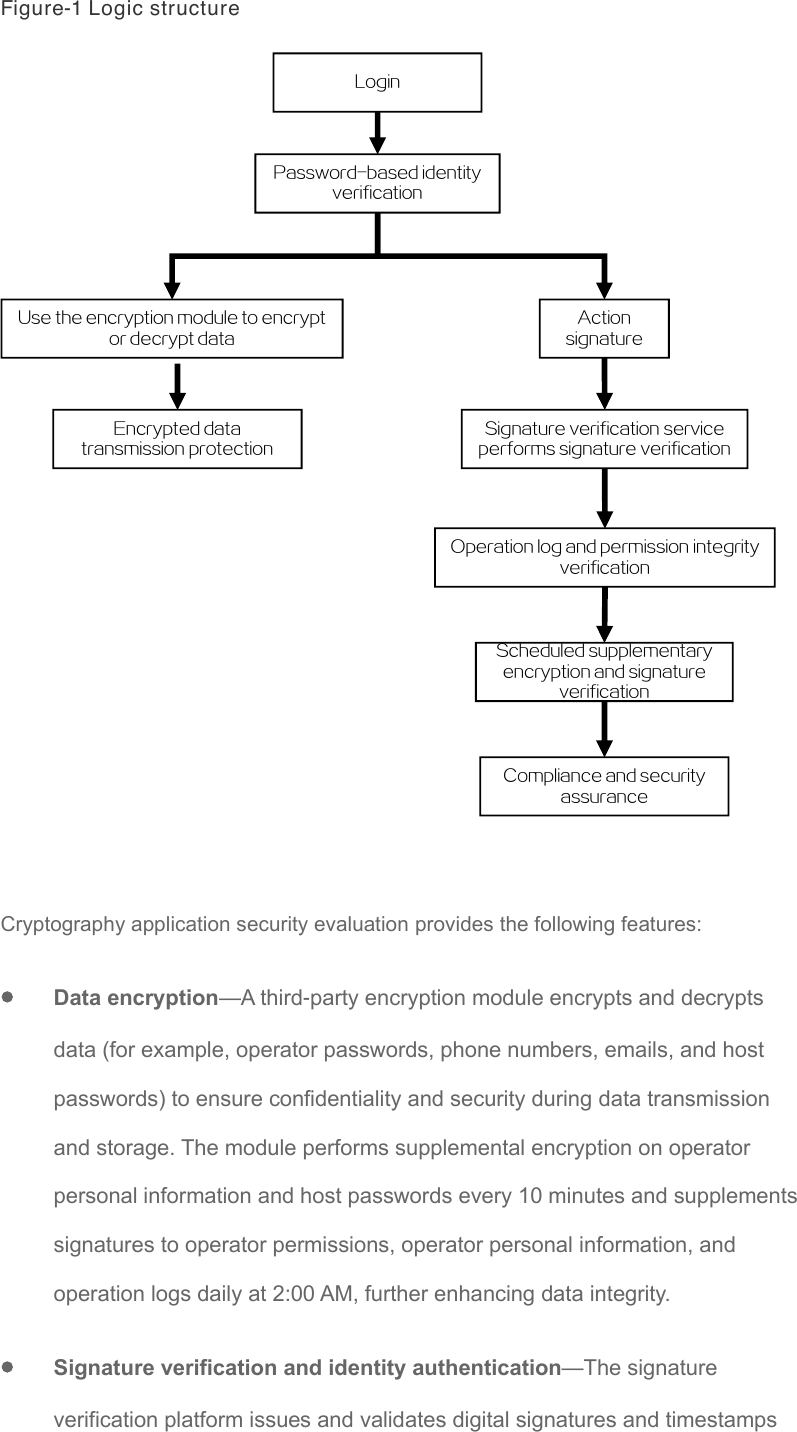
Login
Password-based identity verification
Use the encryption module to encrypt Action or decrypt data signature
Encrypted data Signature verification service transmission protection performs signature verification
Operation log and permission integrity verification
Scheduled supplementary encryption and signature verification Compliance and security assurance
Cryptography application security evaluation provides the following features:
• Data encryption—A third-party encryption module encrypts and decrypts data (for example, operator passwords, phone numbers, emails, and host passwords) to ensure confidentiality and security during data transmission and storage. The module performs supplemental encryption on operator personal information and host passwords every 10 minutes and supplements signatures to operator permissions, operator personal information, and operation logs daily at 2:00 AM, further enhancing data integrity.
• Signature verification and identity authentication—The signature verification platform issues and validates digital signatures and timestamps for operators and administrators, ensuring authentic identities and verifiable actions. All critical operations and logs are signed and verified, guaranteeing tamper-proof and traceable records.
• Operation log and operator integrity protection—After the encryption module is enabled, the system verifies the integrity of operator personal information, operator permissions, and all operation logs. You can view the results in real time in the operator list and logs. Scheduled supplemental encryption and verification prevent malicious tampering with permissions or logs.
Restrictions and guidelines
• In RBAC mode, only a security administrator can manage CASE.
• Before enabling CASE and version upgrades, make sure that the permission integrity is correct for all operators in the system. If the permission integrity of an operator is abnormal before or after the upgrade, the operator cannot log in to the system.
• Before setting up a stateful failover system, make sure neither the primary nor the backup systems are configured with CASE, and that the same directory in the primary and backup systems contains the same component with the same component name.
• With 2FA enabled for login, make sure the CN field on the created UKEY is set to the corresponding operator's name for easy login and use.
• To avoid system errors, do not change the platform type to None after configuring CASE and starting the encryption module.
• For the configuration to take effect, use the systemctl restart tomcat command to restart the Tomcat service from the CLI after you edit the encryption module configuration file, for example, FMDevice.conf.
Configure encryption module settings
By connecting with the encryption module, the system can invoke the encryption algorithms and features provided by the encryption module to protect critical data such as operator passwords, phone numbers, email addresses, and host passwords. This ensures the secure transmission and storage of data, enhancing the overall security and privacy of the system.
-
On the top navigation bar, click Security.
-
From the left navigation pane, select CASE.
-
On the Encryption Module Settings tab, Click Edit.
-
Edit the parameters, and then click OK.
Test connectivity to encryption module
Perform this task to verify whether the communication between the system and the encryption module is normal, ensuring its proper use in subsequent operations.
-
On the top navigation bar, click Security.
-
From the left navigation pane, select CASE.
-
On the Encryption Module Settings tab, Click Edit.
-
Click Test Connectivity next to the Encryption Module IP field.
Enable encryption
Perform this task to implement data encryption after configuring encryption module settings.
-
On the top navigation bar, click Security.
-
From the left navigation pane, select CASE.
-
On the Encryption Module Settings tab, Click Edit.
-
Click Enable Encryption.
Configure signature verification platform settings
The signature verification platform can verify the operator identities after 2FA is enabled for the system. If CASE is not configure, you cannot select Fisec authentication for 2FA.
-
On the top navigation bar, click Security.
-
From the left navigation pane, select CASE.
-
Click the Signature Verification Platform Settings tab, and then click Edit.
-
Edit the parameters, and then click OK.
Test connectivity to signature verification platform
Perform this task to verify whether the communication between the system and the signature verification platform is normal.
-
On the top navigation bar, click Security.
-
From the left navigation pane, select CASE.
-
Click the Signature Verification Platform Settings tab, and then click Edit.
-
Click Test Connectivity next to the Signature Verification Platform IP field.
Parameters
• Encryption Module Settings:
○ Encryption Module State: Current state of the encryption module.
○ Platform Type: Select the type of the encryption module.
○ Encryption Module IP: Enter the IP address of the encryption module. IPv6 addresses are not supported.
○ Encryption Key: Enter the key of the encryption module, which is configured on the encryption module.
○ Component Path: Enter the directory where the CASE component is stored in the system, which must start with /vms. You must manually upload the CASE component (in .tar.gz format) to the specified directory and make sure the configuration is correct. When you set up a stateful failover system, make sure the same component file exists in the same directory on the backup CVM host.
• Signature Verification Platform Settings:
○ Signature Verification Platform: Select the signature verification platform. Only Fisec is supported.
○ Signature Verification Platform IP: Enter the IP address of the signature verification platform. IPv6 addresses are not supported.